
Types of Errors in Excel: Why Copilot and ChatGPT Get Them Wrong (And How to Fix Them)
Types of Errors in Excel: Why Copilot and ChatGPT Get Them Wrong (And How to Fix Them)
Understanding the types of errors in Excel is essential in today’s workplace, especially as tools like Microsoft Copilot and ChatGPT become more widely used. While AI tools can generate answers quickly, they do not guarantee accuracy.
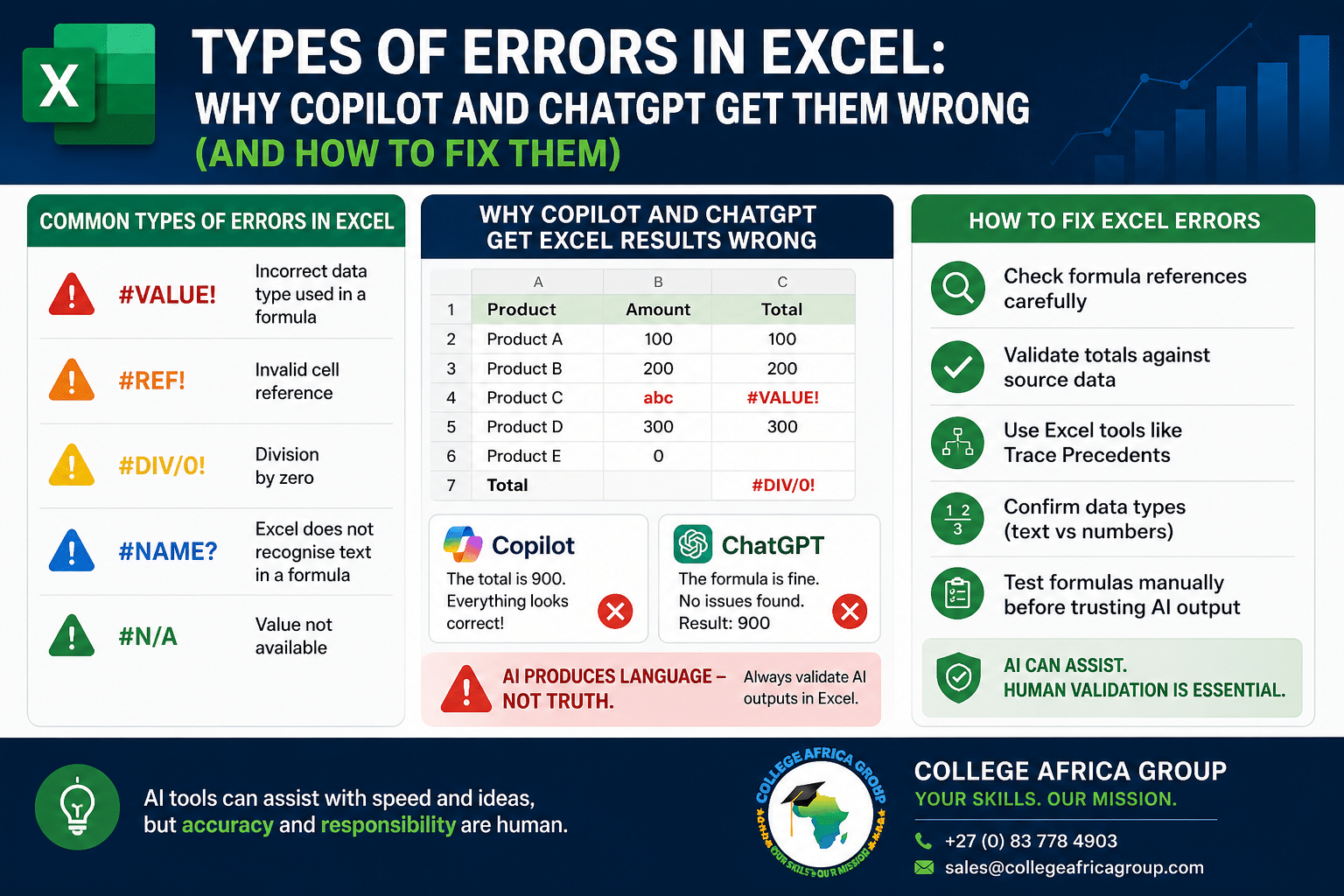
 In fact, many organisations are now facing a new challenge: AI-generated Excel errors that look correct — but are not.
At College Africa Group (CAG), we emphasise a critical principle:
“AI produces language — not truth.”
📥 Download the AI Excel Validation Checklist for Microsoft Copilot and ChatGPT to learn the key steps organisations should follow before trusting AI-generated Excel formulas, summaries, and calculations from Microsoft Copilot and ChatGPT.
Types of Errors in Excel (Complete Breakdown)
The most common types of errors in Excel include:
- #VALUE! – Incorrect data type used in a formula
- #REF! – Invalid cell reference
- #DIV/0! – Division by zero
- #NAME? – Excel does not recognise text in a formula
- #N/A – Value not available
These errors are often easy to detect in Excel — but when AI tools are used, they may be hidden or incorrectly explained. Explore the benefits of getting enrolled on Microsoft Office courses
Types of Errors in Excel When Using Copilot and ChatGPT
In a corporate environment, these types of errors in Excel often go unnoticed, especially when AI tools like Copilot and ChatGPT are used without proper validation. These errors can impact financial reporting, operational decisions, and compliance.
Why Copilot and ChatGPT Get Excel Errors Wrong
Tools like Microsoft Copilot and ChatGPT are designed to generate responses based on patterns, not actual spreadsheet logic.
This leads to common issues such as:
- Incorrect totals or averages
- Missing data in calculations
- Wrong assumptions about datasets
- Confident explanations of incorrect results
Copilot works inside Excel but still depends on how data is structured and saved. ChatGPT, on the other hand, does not directly access your spreadsheet unless you provide the data.
These real-world examples highlight why understanding the types of errors in Excel is critical when using AI tools.
How to Fix Common Excel Errors
To correctly resolve the types of errors in Excel, users should:
- Check formula references carefully
- Validate totals against source data
- Use Excel tools like Trace Precedents
- Confirm data types (text vs numbers)
- Test formulas manually before trusting AI output
In a corporate environment, these validation steps are essential to ensure accuracy and accountability.
Additional Articles in the Series with Free Download Guides
Excel Errors vs AI Outputs: What You Must Verify
AI tools can assist with speed — but not responsibility.
Before accepting any output generated by Copilot or ChatGPT, always verify:
- Are all rows included?
- Are the calculations correct?
- Are assumptions clearly stated?
- Does the output match business logic?
This is especially important for finance, HR, and reporting teams, where incorrect data can lead to serious consequences.
Using Copilot and ChatGPT Safely in the Workplace
AI tools should be used as assistants — not decision-makers.
Best practice includes:
- Using AI to draft or suggest outputs
- Validating results in Excel
- Ensuring no sensitive data is shared improperly
- Applying internal governance policies
Organisations should also ensure staff have strong foundational Excel skills before relying on AI tools.
To reduce risk and improve accuracy, many companies are investing in AI in the Workplace training for their teams.
Using Better Prompts to Reduce Excel Errors
While understanding the types of errors in Excel is critical, improving how you interact with AI tools can reduce the likelihood of incorrect outputs.
Instead of vague prompts such as:
- “Summarise this data”
Use structured prompts:
- “Summarise total sales by region using all rows in the dataset and confirm the number of records used.”
This approach improves clarity, but it does not remove the need for validation. Even well-structured prompts can produce incorrect results if underlying data or assumptions are flawed.
This is why organisations combine strong Excel skills with effective AI prompting techniques.
Related Excel Error Guides
AI tools can generate formulas quickly, but many workplace spreadsheet problems still come down to understanding and validating Excel errors correctly.
Read our detailed guide:
➡️ #VALUE! Error in Excel: What It Means and How to Fix It
This practical article explains:
- What causes the #VALUE! error
- Common formula mistakes
- How AI-generated formulas can trigger hidden spreadsheet issues
- Step-by-step fixes for business users
Understanding Excel errors remains essential — even when using AI tools like ChatGPT or Microsoft Copilot.
As AI adoption in Excel continues to grow, many organisations are now comparing Microsoft Copilot and ChatGPT for reporting, analysis, and spreadsheet automation.
In our latest article, “Copilot vs ChatGPT in Excel: Why Both Get Data Wrong”, we explain how both tools can generate convincing but incorrect outputs, why validation remains essential, and what businesses should check before trusting AI-generated Excel results.
Corporate Excel and AI Training
College Africa Group (CAG) provides practical corporate training in Excel, Microsoft Copilot, and AI in the workplace.
We focus on real-world applications, data accuracy, and responsible AI usage.
Microsoft also provides official guidance on identifying and resolving Excel errors, which can support internal validation processes:
Excel help and learning resources.
Microsoft provides official guidance on identifying and resolving Excel errors:
Excel help and learning resources.
Contact us:
📞 +27 (0) 83 778 4903
📧 sales@collegeafricagroup.com
Frequently Asked Questions
What are the most common types of errors in Excel?
The most common errors include #VALUE!, #REF!, #DIV/0!, #NAME?, and #N/A.
Why does Copilot give incorrect Excel results?
Copilot generates responses based on patterns and may misinterpret data or formulas.
Can ChatGPT fix Excel errors?
ChatGPT can suggest solutions but cannot validate live spreadsheet data.
How do I verify Excel data when using AI?
Always cross-check calculations, review formulas, and confirm data sources.
Is AI reliable for Excel reporting?
AI can assist, but human validation is always required for accuracy.
—
⚖️ This solution is designed to remain POPIA-appropriate when implemented correctly. It does not access, share, or store personal data. Organisations should still review their internal policies and compliance frameworks before adoption.

You may also like

Is Your Finance Team Producing Reports—or Producing Insight?
Is AI Delivering Operational or Strategic Value?